


- Canon EOS RP Mirrorless Digital Camera Body
- RF24-105mm f/4-7.1 IS STM Lens
- Battery Pack LP-E17
- Battery Charger LC-E17
- Camera Cover R-F-5
- Wide Neck Strap
- Lens Cap E-67II
- Lens Dust Cap RF
Trusted & Verified


Canon EOS RP Mirrorless Digital Camera with 24-105mm f/4-7.1 STM Lens Kit
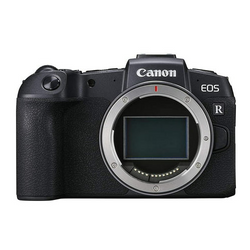
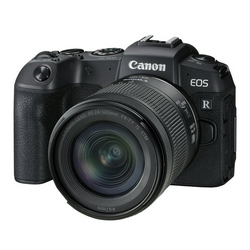
- 26.2MP full-frame CMOS sensor
- DIGIC 8 image processor
- 4K (UHD) 3840 x 2160 video recording
- 3-inch clear view LCD II vari-angle touchscreen LCD
- Built-in Wi-Fi and Bluetooth connectivity
- 0.39-type OLED EVF
- f/11 compatible in all AF areas
- ISO range of 100-40000 for stills
- Canon RF24-105mm f/4-7.1 IS STM lens
From stunning portraits to breathtaking landscapes, capture high-quality images with the EOS RP RF24-105mm f/4-7.1 IS STM Lens Kit. Our lightest and smallest full-frame EOS camera to date, the EOS RP is packed with impressive features, including a 26.2 MP CMOS sensor, 4K video and DIGIC 8 image processor. Plus, with the RF24-105mm f/4-7.1 IS STM’s compact size, versatile zoom range and optical image stabilization with up to 5 stops of shake correction, this lens kit will make the perfect match for capturing a variety of subjects.
Lightest, Smallest Full-frame EOS Camera
For all their appealing features one of the concerns of using a full-frame camera has been its larger profile, however, the EOS RP is the lightest and smallest Canon EOS full-frame camera to date. Weighing approximately 440g (body only) while being impressively compact and comfortable to use, the EOS RP is more convenient to carry, shoot with, and store than any previous EOS full-frame camera before.
Compatible with EF/EF-S Lenses
Engineered to work seamlessly with RF lenses, the EOS RP also maintains complete compatibility with EF and EF-S lenses by using one of three optional Mount Adapters. When using EF-S lenses, the EOS RP even crops automatically to reflect the APS-C sized sensor the lenses are designed for.
26.2 Megapixel Full-frame CMOS Sensor
The EOS RP camera features a Canon-developed and produced 35mm full-frame CMOS sensor with approx. 26.2 effective megapixels. It employs the DIGIC 8 Image Processor to enhance the speed of operations across the board. This means fast, efficient performance and phenomenal image quality for big prints.
ISO 40000 Sensitivity Range
The EOS RP camera has a standard ISO sensitivity range of 100-40000 for stills and 100-25600 for video (100-12800 for 4K video shooting). Combined with the EOS RP camera's remarkable low-light AF performance, still and video shooting is possible even in dark situations
Digital Lens Optimizer
The EOS RP camera has an in-camera Digital Lens Optimizer that works with RF lenses (and EF/EF-S lenses with a Mount Adapter) to provide a substantial improvement in image quality. The Digital Lens Optimizer limits deterioration in image quality caused by low-pass filters or wide-aperture lens designs. It's usable both during shooting and when developing RAW data, and does not affect continuous shooting speeds. Data from compatible EF and EF-S lenses is built into the camera, and data information from RF lenses is transferred near instantly through the EOS RP's 12-pin communication system.
High-Speed Focusing in Approximately 0.05 Seconds
The EOS RP camera's highly responsive Dual Pixel CMOS AF system features 4,779 manually selectable AF points and can deliver sharp focus within approximately 0.05 seconds. This means fast action can be captured and focus can be maintained with speed, accuracy and ease.
Excellent Low-light Performance
Amazing for nighttime photography or in very low light, the EOS RP camera's brilliant AF can operate in light as dim as a light rating of EV -5 where other AF systems may fail or search. Phenomenal AF is achieved even when using lenses with high F numbers. This ultra-sensitive AF works in concert with the EOS RP's EVF to clearly capture subjects even when there's limited light.
Vari-angle Touchscreen LCD
The EOS RP camera features a 3-inch, 1.04 Megapixel Clear View LCD II Vari-angle Touchscreen LCD. Brightness is adjustable in seven levels. Its extensive flexibility makes it easy to compose and shoot from virtually any angle, making selfies simple and enabling the LCD to fold away when not in use. The brightness of the EVF and the LCD monitor can even be adjusted individually - a first for an EOS camera. Touchscreen features include settings, review and even AF point selection.
Canon EOS RP Mirrorless Digital Camera Body
General
| Type | Digital single-lens non-reflex AF/AE camera |
| Recording media |
|
| Image format | Approx. 35.9 x 24.0mm |
| Compatible lenses | Canon RF lens group (excluding EF, EF-S and EF-M lenses). When using Mount Adapter EF-EOS R: Canon EF or EF-S lenses (excluding EF-M lenses) |
| Lens mount | Canon RF mount |
Image Sensor
| Type | CMOS sensor (compatible with Dual Pixel CMOS AF) |
| Pixels | Approx. 26.2 megapixels |
| Pixel unit | Approx. 5.76 µm square |
| Total pixels | Approx. 27.1 megapixels |
| Aspect ratio | 3:2 (Horizontal:Vertical) |
| Color filter system | RGB primary color filters |
| Low pass filter | Installed in front of the image sensor, non-detachable |
| Dust deletion feature |
|
Recording System
| Recording format | |
| Compliant to Design rule for Camera File system 2.0 and Exif 2.3 | |
| Supports time difference information in Exif 2.31 | |
| File size |
|
| 1.6x (crop) |
|
| 4 | 3 aspect ratio |
|
|
| 16 | 9 aspect ratio |
|
|
| 1 | 1 aspect ratio |
|
|
| File numbering |
|
| RAW + JPEG simultaneous recording | Possible |
| Color space | Selectable between sRGB and Adobe RGB |
| Picture style |
|
White Balance
| Settings |
|
| Auto White Balance | Option between ambience priority and white priority settings |
| Color temperature compensation |
|
Viewfinder
| Type | OLED color electronic viewfinder |
| Coverage | Approx. 100% vertically and horizontally relative to the shooting image area (with image quality L, at approx. 23mm eyepoint) |
| Magnification | Approx. 0.70 (with 50mm lens at infinity, -1 m-1) |
| Eye point | Approx. 22mm (at -1 m-1 from the eyepiece lens end) |
| Viewfinder information |
|
Autofocus
| Type | Phase-difference detection system with image sensor (Dual Pixel CMOS AF) |
| AF points | Max. 4,779 (When selected with cross keys) |
| AF working range | EV -5 to 18 (f/1.2, at 73 degree F/23 degree C, ISO 100, One-Shot AF) |
| Focusing modes |
|
| AF Assist beam |
|
Exposure Control
| Metering modes | Real-time metering with image sensor (384 [24x16]) |
|
|
| Metering range | EV -3 - 20 (at 73 degree F/23 degree C, ISO 100) |
| Exposure control systems |
|
| AE Lock |
|
Shutter
| Type | Electronically controlled focal-plane shutter |
|
|
| Shutter speeds |
|
| Shutter release | Soft-touch electromagnetic release |
| Self timer | 10-sec. delay, 2-sec. delay, Continuous shooting |
External Speedlite
| Flash metering | E-TTL II autoflash |
| FE Lock | Provided |
| External flash settings |
|
| Flash exposure compensation | ±3 stops in 1/3- or 1/2-stop increments |
Drive System
| Drive modes |
|
Live View Functions
| Shooting modes | Still photo shooting and video shooting |
| Focusing |
|
| Metering modes |
|
| Metering range | EV -2.5 - 18 (at 73 degree F/23 degree C, ISO 100, One-Shot AF, with 29.97 fps) |
| Grid display |
|
Video Shooting
| File format | MP4 |
|
|
| Variable (averaged) bit rate |
|
| Focusing |
|
| Range | Full range (0 to 255) |
LCD Monitor
| Type | TFT color, liquid-crystal monitor |
| Monitor size |
|
| Pixels | Approx. 1.04 million dots |
| Coverage | Approx. 100% vertically/horizontally |
| Brightness control | Manually adjustable to one of seven brightness levels |
| Coating | Clear View LCD II |
|
|
| Interface languages | 29 (English, German, French, Dutch, Danish, Portuguese, Finnish, Italian, Ukraine, Norwegian, Swedish, Spanish, Greek, Russian, Polish, Czech, Hungarian, Vietnamese, Hindi, Romanian, Turkish, Arabic, Thai, Simplified/Traditional Chinese, Korean, Malay, Indonesian, Japanese) |
Playback
| Display format |
|
| Highlight alert | The white areas with no image data will blink. |
Image Protection and Erase
| Protection |
|
| Erase (Except protected images) |
|
Direct Printing
| Compatible printers | Images can be sent via Wi-Fi to a PictBridge-compatible (Wireless LAN) printer and printed. |
DPOF: Digital Print Order Format
| DPOF | Compliant to DPOF Version 1.1 |
Interface
| USB terminal | Equivalent to SuperSpeed USB (USB 3.1 Gen 1) |
|
|
| Video out terminal |
|
| Extension system terminal | 3.5mm diameter stereo mini jack |
Power Source
| Battery | LP-E17 x 1 |
|
|
| Power saving |
|
| Viewfinder off | Available time options: 1 min. / 3 min. / Disable |
|
|
| Date/time battery |
|
| Start-up time | Approx. 0.82 seconds |
Operating Environment
| Working humidity range | 85% or less |
| Working temperature range | 32-104 degree F / 0-40 degree C |
Dimensions and Weight
| Dimensions (W x H x D) |
|
| Weight |
|
Starting at $66.61/mo
Estimated over 18 months with Affirm, subject to eligibility and approval.
Flexible payment options available
Interest-free installments and monthly financing may be available through Shop Pay on eligible purchases.
Starting at $299.75
No interest if paid in full by the promotional terms. Minimum monthly payments required and subject to credit approval.
Shipping Policy
Orders of $25 or more qualify for free standard shipping on eligible items.
Most in-stock orders placed before 3PM EST Monday–Friday ship the same business day. View Shipping Policy
Free Local Pickup
Please call for store stock availability. Requests made before 2:30 PM EST can be available for next-day pickup. Learn more


Tab: Frequently Asked Questions
How do I return an item?
How do I return an item?
Returns are incredibly simple. Please log into your account, find your item you wish to return and follow the prompts to make a return. If you do not have an account, click here to find your order and make a return.
Will I receive a full refund when I return an item?
Will I receive a full refund when I return an item?
You will receive a full refund when you return an item in its original manufacturer’s packaging, undamaged and unmarked. If the item you are returning is priced at less than $35, you will be charged a 15% restocking fee. Please note you will not be refunded any shipping charges.
How many days do I have to make a return?
How many days do I have to make a return?
You have 30 days to make a return. During the holiday season, from November 1 to December 31, we extend the return window to 60 days.
My item was damaged in transit. How do I place a return?
My item was damaged in transit. How do I place a return?
If your order has been noticeably damaged in transit, we strongly recommend that you refuse delivery and notify us immediately. Claims for missing items or items damaged in transit must be made within 48 hours of delivery. If there is carrier damage, please contact support@focuscamera.com with your order number and a description of the damage.
There’s an issue with my order, what should I do?
There’s an issue with my order, what should I do?
Oh no! Please contact our customer service team so we can resolve the issue immediately. You can call us on 1.800.221.0828, email us at support@focuscamera.com, or send us a message here.
Can I exchange an item?
Can I exchange an item?
We do not currently offer exchanges. Please return the item you purchased within 30 days and order what you’d like instead.
If I ordered a kit, do I have to return all the items?
If I ordered a kit, do I have to return all the items?
If you ordered a kit, you must return all components and accessories to receive a full refund.
I ordered a product that included a free item. I’d like to return it, do I need to return the free item as well?
I ordered a product that included a free item. I’d like to return it, do I need to return the free item as well?
If you ordered a product that included a free item, you must include the free item with your return. If not, your return will not be accepted and you will not receive a full refund.
Do you offer repairs?
Do you offer repairs?
We currently only offer camera repairs at our Brooklyn store. The item must be dropped off and collected in person as we do not accept shipped items for repair. For more information, please call our Brooklyn store on 1.718.431.7900.
What is your return policy?
What is your return policy?
Most items can be returned within 30 days for a full refund. Click here to read our full return policy.


