


- Canon EOS R5 C VR Creator Kit with RF 5.2mm f/2.8 Dual Fisheye Lens for 180 Degree VR Shooting
- EOS R5 C Digital Cinema Camera
- Battery Pack LP-E6NH
- Battery Charger LC-E6
- Shoulder Strap SS-1200
- Interface Cable IFC-100U
- Cable Protector
- Camera Cover
- RF5.2mm F2.8 L Dual Fisheye Lens
- Canon Lens Case LS1014
- Dedicated Canon Lens Cap 5.2
- Canon Lens Dust Cap RF
- Hexagon Wrench
- Limited 1-Year Warranty
Trusted & Verified


Canon EOS R5 C VR Creator Kit with RF 5.2mm f/2.8 Dual Fisheye Lens for 180 Degree VR Shooting
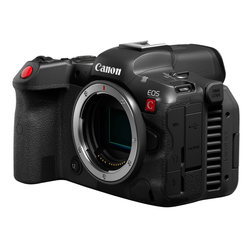
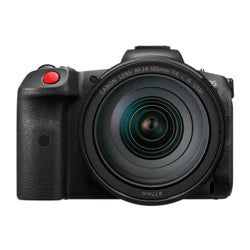
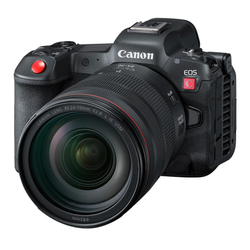
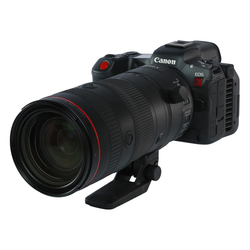
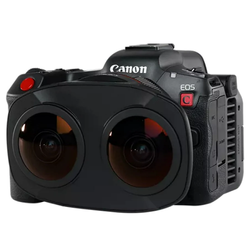
- Precise video control for the dedicated video professional
- Supports 8K/60P Internal RAW Recording
- Up to 4K 120P slow and fast motion recording mode
- 4:2:2 10-bit motion record
- Canon Log 3 expands expressive possibilities
- Digital interchangeable lens that enables stereoscopic 3D
- 180-degree VR shooting to a single image sensor
- Streamlined VR workflow
- Stereoscopic 3D with an interpupillary distance of 60mm
- Natural parallax with 190-degree field of view
Unlock Your Creative Potential with Canon's VR Content Creator Kit. With a wide range of features, this kit equips you with the right tools to elevate your videography skills to modern standards. Create immersive experiences from the tip of your fingertips.
Explore Your Imagination
Immerse your viewers in a whole new dimension of filming with the VR Content Creator Kit. This kit gives you the tools to create using Canon’s EOS VR System, beginning with the RF5.2mm F2.8 L Dual Fisheye Lens which features a beautifully engineered and optimized folded optical design, with separate Left and Right optical systems helping you capture stereoscopic 3D imagery with a 190 degree field of view to a single full-frame image sensor. Also included is the EOS R5 C, a full-frame hybrid camera that expertly combines many of the video formats and features from the Canon Cinema EOS lineup with the distinguished still-imaging capabilities of the EOS R System.
Simple Lens Swap
The pairing of the RF5.2mm F2.8 L Dual Fisheye Lens and the EOS R5 C brings high-resolution video recording at up to 8K DCI 30p and 4K DCI 60p. With a beautifully engineered folded optical design, the dual high-performance L-series fisheye lens combines imagery onto a single image sensor delivering impressive results to a single file. This can help simplify your workflow by eliminating the need to sync and stitch multiple video files. An integral part of the EOS VR System, Canon's EOS VR Utility software can easily convert footage to your choice of editing software. For Adobe Premiere Pro users, the EOS VR Plug-in software can help streamline your editing process. Both paid subscription-based software solutions allow for convenient post-production. Now, creators can go from traditional stills or video shooting to stereoscopic 3D capture with a Simple Lens Swap.
VR With Ease
The VR Content Creator Kit provides the capability of delivering a single file creating a powerful and convenient solution compared to traditional VR systems which capture a 3D scene with two separate fisheye lenses, recording that imagery to two separate cameras or image sensors, which write two files. This can save the user time and effort behind the camera, and in post-production by helping to solve issues such as multi-camera positioning, multi-lens syncing, image stitching, audio syncing, encoding, and more.
Camera Firmware
To help improve the user experience with the uniqueness of shooting with the RF5.2mm F2.8 L Dual Fisheye lens, special features have been added to the firmware to optimize VR shooting. This firmware provides metadata information for the software to convert the image from fisheye to equirectangular. One of the features enabled with the use of this lens is a 'Magic Window' on-screen overlay, accessed by tapping the [INFO] button that assists the creator in framing the central resting position which shows an approximate field of view in the composition. The user can magnify at 6x and 15x magnification and then also use MF Peaking while magnified (a first for Canon EOS cameras) and additionally can swap between the left and right lenses with a simple tap of the [INFO] button while magnified. This is incredibly useful when manually focusing the lens.
EOS VR Utility and EOS VR Plugin
Canon's subscription-based software solutions are an integral part of Canon's EOS VR System. Options include the EOS VR Utility or the EOS VR Plug-in for Adobe Premiere Pro, each providing a different workflow experience for VR creators and studios. With either solution, conversion of the Dual Fisheye lens imagery to stereoscopic 3D 180-degree VR format in equirectangular imagery is possible, as well as the processing and exporting of the imagery at various resolutions and file formats so files can be viewed in compatible Head Mount Displays (such as the Meta Quest 2 or Pico G2).
Canon EOS R5 C VR Creator Kit with RF 5.2mm f/2.8 Dual Fisheye Lens for 180 Degree VR Shooting
Type
| Type | Digital single-lens non-reflex AF/AE camera |
| Image Processor | DIGIC X |
| Recording Media | |
|
|
| SD card | |
|
|
| Compatible Lenses |
Canon RF lens group (excluding EF, EF-S, and EF-M lenses)
When using Mount Adapter EF-EOS R: Canon EF or EF-S lenses (excluding EF-M lenses)
| Lens Mount | Canon RF mount |
Image Sensor
| Type | CMOS sensor (compatible with Dual Pixel CMOS AF) |
| Effective pixels | Approx. 45.0 megapixels |
| Sensor size | Approx. 36.0 x 24.0 mm |
| Pixel size | Approx. 4.40 micro square |
| Total pixels | Approx. 47.1 megapixels |
| Aspect ratio | 3:2 (horizontal:vertical) |
| Color filter system | RGB primary color filters |
| Low Pass Filter | Installed in front of the image sensor, non-detachable |
| Dust Deletion Feature |
|
| Dust Delete Data acquisition and appending | |
|
|
| Manual cleaning (by hand) |
Recording System
| Recording Format | Compliant to Design rule for Camera File system 2.0 and Exif 2.3*. |
| *Supports time difference information in Exif 2.31. | |
| Image Format | JPEG, HEIF, RAW (CR3, 14 bit RAW format), C-RAW (Canon original); Movies: ALL-I, IPB, RAW |
| HDR mode-continuous shooting |
|
| Advanced shooting operations |
|
| File size |
|
| * Indicate an inexact proportion. | |
| File numbering | |
| The following file numbers can be set |
|
| Auto reset | |
|
|
| Manual reset | |
|
|
| *When manually resetting the file number, folders can also be renamed. | |
| RAW + JPEG / HEIF Simultaneous Recording | Simultaneous recording of any combination of RAW/C-RAW and JPEG/HEIF image-recording quality is supported. |
| Color Space | Selectable between sRGB and Adobe RGB |
| Picture style |
|
White Balance
| Settings | |
|
|
| Auto white balance | Option between ambience priority and white priority settings. |
| White balance shift |
|
Viewfinder
| Type | OLED color electronic viewfinder; approx. 5.76 million dots resolution |
| Coverage | Approx. 100% vertically and horizontally relative to the shooting image area (with image quality L, at approx. 23mm eyepoint). |
| Magnification / Angle of View | Approx. 0.76x / Approx. 35.5 degrees (with 50mm lens at infinity, -1 m -1) |
| Eye point | Approx. 23mm (at -1 m -1 from the eyepiece lens end) |
| Dioptric adjustment range | Approx. -4.0 to + 2.0 m -1 (dpt) |
| Viewfinder information |
|
Autofocus
| Focus method | Dual pixel CMOS AF II |
| Number of AF zones available for automatic selection |
|
| AF Working Range |
|
| AF Methods |
|
| Subject to Detect |
|
Exposure Control
| Metering modes | |
|
|
| Metering range | EV -3 - 20 (at 73F/23C, ISO 100) (Still Photo Shooting) |
| Exposure control modes |
|
| ISO speed range | |
| Available ISO speeds; user-set | |
| Normal | ISO 100-51200 (1/3- or 1-stop increments) |
| Expanded L | Equivalent to ISO 50, H: 102400 |
| For [Highlight tone priority], the minimum ISO speed limit will be ISO 200 to 51200. | |
| Expanded ISO cannot be set for HDR mode or during HDR PQ shooting. | |
| User-defined ISO range - still photo shooting | |
| ISO Speed Range | ISO speed |
| Minimum | L (50)-51200 (in 1-stop increments) |
| Maximum | ISO 100-H (102400) (in 1-stop increments) |
| * Expanded ISO speeds are noted as being equivalent to these speeds. | |
| User-defined Auto ISO range - still photo shooting | |
| Auto Range | ISO speed |
| Minimum | ISO 100-25600 (in 1-stop increments) |
| Maximum | ISO 200-51200 (in 1-stop increments) |
| ISO Auto details in still photo shooting | |
| Shooting Mode |
|
| Using Flash | |
|
|
| * 1 ISO 200 when [Highlight tone priority] is set to [Enable] or [Enhanced]. | |
| * 2 Varies depending on [Maximum] and [Minimum] of [Auto range]. | |
| * 3 If outside the setting range, changed to the value most close to ISO 400. | |
| * 4ISO 1600 when using a lens that is not compatible with Variable control of maximum ISO Auto limit for E-TTL | |
| Exposure Compensation | |
| Manual ±3 stops in 1/3- or 1/2-stop increments | |
| AEB ±3 stops in 1/3- or 1/2-stop increments | |
| AE Lock |
|
| User-applied AE lock | |
|
Shutter
| Type |
|
| Shutter Speeds |
|
| X-sync Speed |
|
| Shutter Release | Soft-touch electromagnetic release |
| Self Timer | 10-sec. delay, 2-sec. Delay |
| Shutter Lag Time | |
| Shutter-release time lag *Measured with shutter button pressed fully from half-pressed position | |
|
|
| Flash used | |
|
Image Stabilization (IS mode)
| Still Photo IS | Optical IS with RF and EF lenses equipped with Image Stabilization. |
|
|
| Video IS | A narrower angle of view is used when digital image stabilization is selected in the menu. This is equivalent to approx. 1.1x longer focal length when Electronic Image Stabilization mode (Standard) is selected. Also, this is equivalent to approx. 1.43x longer focal length when Electronic Image Stabilization mode (High) is selected. |
External Speedlite
| E-TTL balance | Ambience priority, standard, flash priority |
| Compatible E-TTL speedlites | Canon EX- and EL-series speedlites |
| E-TTL II Flash Meterings |
|
| Slow sync (P/Av modes) |
|
| Flash Function Menu | Provided for EX- and EL-series Speedlites |
| Flash Exposure Compensation | +-3 stops in 1/3- or 1/2-stop increments |
| Continuous flash control |
|
HDR Shooting - Still
| HDR PQ shooting | Disable / enable |
| HDR PQ Shooting - Still | |
|
Video Shooting
| Focusing | Dual Pixel CMOS AF |
| Exposure compensation | +-3 stops in 1/3- or 1/2-stop increments |
| Canon log | Provided (Off / Canon Log 3) |
LCD Screen
| Type | TFT color, liquid-crystal monitor |
| Monitor size |
|
| Dots | Approx. 2.1 million dots |
| Coverage | Approx. 100% vertically/horizontally |
| Brightness control | Manually adjustable to one of seven brightness levels |
| Coating |
|
| Interface Languages | 12 (English, German, Spanish, French, Portuguese, Italian, Ukraine, Russian, Polish, Simplified Chinese, Korean, Japanese) |
Playback
| Highlight alert | The white areas with no image data will blink. |
| Histogram | Brightness and RGB |
Quick Control Function
| Function | The Quick Control screen is accessed by pressing the Quick Control button during still photo shooting. |
Image Protection and Erase
|
|
| All found images (only during image search) | |
| Erase | |
| Except protected images | |
|
Direct Printing
| Compatible Printers | Not supported |
DPOF: Digital Print Order Format
| DPOF | Compliant to DPOF Version 1.1 |
Wi-Fi
| Standards compliance | IEEE 802.11a/ac/b/g/n |
| Transmission method |
|
| Transition Frequency (Central Frequency) | |
| 2.4 GHz band frequency | 2412 to 2462 MHz |
| Channels | 1 to 11 channels |
| 5 GHz band Frequency | 5180 to 5825 MHz |
| Channels | 36 to 165 channels |
| Connection Method | |
|
|
| Communication with a smartphone |
|
| Remote Operation Using EOS Utility | The camera can be controlled via Wi-Fi using EOS Utility. |
| Print from Wi-Fi Printers | Not supported. |
| Send images to a web service | Still photos (RAW, C-RAW, HEIF, and JPEG) and movies (MP4) can be uploaded to image.canon server album. |
| With the image.canon server, images can be sent to social media or a photo album link can be sent (by the image.canon specifications). |
Bluetooth
| Standards compliance | Bluetooth specification version 5.0 compliant (Bluetooth low energy technology) |
| Transmission method | GFSK modulation |
Customization
| Custom functions | 22 custom functions are settable. |
| Custom controls |
|
| Customizable Dials |
|
| My Menu Registration | |
| Up to six top-tier menu items and Custom Functions can be registered. | |
| Up to five My Menu tabs can be added. | |
| My Menu tab overall operations |
|
| My Menu tab detailed operations |
|
Interface
| USB terminal |
|
| Video out terminal |
|
| Clean HDMI output | Provided |
| Microphone input terminal | 3.5mm diameter stereo mini jack |
| Headphone terminal | 3.5mm diameter stereo mini jack |
Power Source
| Battery |
|
| * LP-E6 is automatically recognized as Mode C - Blinking White Drive mode regardless of capacity. |
Battery Check:
|
|
| Start-up Time |
|
Dimensions and Weight
| Dimensions (W x H x D) |
|
| Weight | |
| Approx. 1.7 lb/ 770 gram (including battery, CFexpress card; without body cap) | |
| Approx. 1.5 lb/ 680 gram (body only; without battery, card or body cap) |
Operating Environment
| Working temperature range | 32-104 F / 0-+40C |
| Working humidity | 85% or less |
Lens
| Focal length | 5.2mm |
| Maximum and minimum aperture | f/2.8 – f/16 (1/3 stops, 1/2 stops) |
| Lens mount type | Canon RF mount; metal mount |
| InterpupillarydDistance / baseline length (Distance between left and right lens centers) | 60mm |
| Minimum focusing distance | 0.66 ft. (7.9 in.) / 0.2 m |
| Maximum magnification | 0.03x |
| Angle of view (diagonal) | 190 degree |
| Lens construction (each lens) | 12 elements in 10 groups |
| Special elements (each lens) | Two UD glass elements |
| Lens coating |
|
| Filter size diameter | |
| Supported | Built-in |
| Aperture blades (each lens) | 7 |
| Lens switches | None |
| Dust/water resistance | Provided (rubber ring on lens mount) |
| Focusing System | Manual focusing |
| Left/right focus difference adjustment | User-adjustable, via adjustment dial (using included 1.5mm hexagonal wrench) |
| Dual Pixel CMOS AF | Not Supported — Manual focus only |
| Focus guide | Supported – Alternate at image center of either selected lens UI by INFO button with cameras equipped with compatible firmware. |
| Manual focus peaking | Supported with compatible cameras. |
| Full-time manual focusing | Not supported |
| Control ring | Not supported |
| IS mode selection | Not supported |
| Optical image stabilization | Not supported |
| Dimensions (W x H x L) | 4.8 x 3.3 x 2.1 inch (121.1 x 83.6 x 53.5 mm) |
| Weight | Approx. 12.4 ounce (350 gram) |
Accessories
| Lens hood | Not Supported |
| Canon lens case LS1014 (bundled) | |
| RF tele extenders | Not compatible |
| EF extension tubes | Not compatible |
| Close-up lenses | Not compatible |
| Canon Gelatin Filter Holder IV | Not compatible; Built-in gelatin filter holder at rear of lens |
Join the notification list for this product.
We'll email you as soon as this item is back in stock.
Use the notification email to come back and complete your purchase while inventory is available.
Join the notification list for this product.
We'll email you as soon as this item is back in stock.
Use the notification email to come back and complete your purchase while inventory is available.
Shipping Policy
Orders of $25 or more qualify for free standard shipping on eligible items.
Most in-stock orders placed before 3PM EST Monday–Friday ship the same business day. View Shipping Policy
Free Local Pickup
Please call for store stock availability. Requests made before 2:30 PM EST can be available for next-day pickup. Learn more


Tab: Frequently Asked Questions
How do I return an item?
How do I return an item?
Returns are incredibly simple. Please log into your account, find your item you wish to return and follow the prompts to make a return. If you do not have an account, click here to find your order and make a return.
Will I receive a full refund when I return an item?
Will I receive a full refund when I return an item?
You will receive a full refund when you return an item in its original manufacturer’s packaging, undamaged and unmarked. If the item you are returning is priced at less than $35, you will be charged a 15% restocking fee. Please note you will not be refunded any shipping charges.
How many days do I have to make a return?
How many days do I have to make a return?
You have 30 days to make a return. During the holiday season, from November 1 to December 31, we extend the return window to 60 days.
My item was damaged in transit. How do I place a return?
My item was damaged in transit. How do I place a return?
If your order has been noticeably damaged in transit, we strongly recommend that you refuse delivery and notify us immediately. Claims for missing items or items damaged in transit must be made within 48 hours of delivery. If there is carrier damage, please contact support@focuscamera.com with your order number and a description of the damage.
There’s an issue with my order, what should I do?
There’s an issue with my order, what should I do?
Oh no! Please contact our customer service team so we can resolve the issue immediately. You can call us on 1.800.221.0828, email us at support@focuscamera.com, or send us a message here.
Can I exchange an item?
Can I exchange an item?
We do not currently offer exchanges. Please return the item you purchased within 30 days and order what you’d like instead.
If I ordered a kit, do I have to return all the items?
If I ordered a kit, do I have to return all the items?
If you ordered a kit, you must return all components and accessories to receive a full refund.
I ordered a product that included a free item. I’d like to return it, do I need to return the free item as well?
I ordered a product that included a free item. I’d like to return it, do I need to return the free item as well?
If you ordered a product that included a free item, you must include the free item with your return. If not, your return will not be accepted and you will not receive a full refund.
Do you offer repairs?
Do you offer repairs?
We currently only offer camera repairs at our Brooklyn store. The item must be dropped off and collected in person as we do not accept shipped items for repair. For more information, please call our Brooklyn store on 1.718.431.7900.
What is your return policy?
What is your return policy?
Most items can be returned within 30 days for a full refund. Click here to read our full return policy.


