


- Canon EOS R8 Content Creator Kit Camera
- Camera Cover R-F-5
- Strap ER-EOSR8
- Battery Charger LC-E17
- Battery Pack LP-E17
- Battery Pack Cover
- RF24-50mm F4.5-6.3 IS STM Lens
- Lens Cap E-58II
- Lens Dust Cap RF
- Shoe Cover
- Stereo Microphone DM-E100
- Wind Screen
- Tripod Grip HG-100TBR
- Limited 1-Year Warranty
Trusted & Verified


Canon EOS R8 Content Creator Kit Camera with In-Camera Compositing, Stereo Microphone and Lens Cap
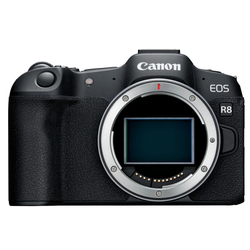
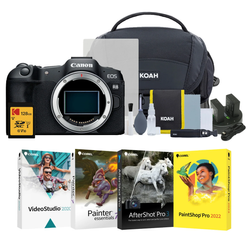
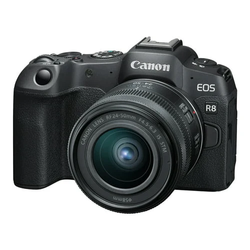
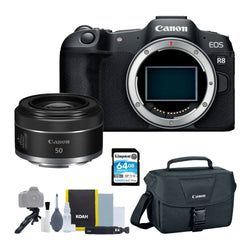
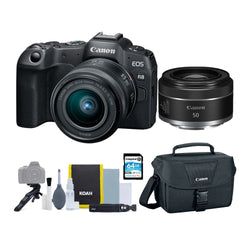
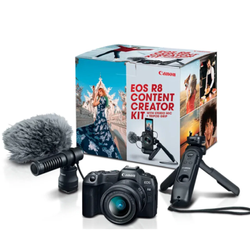
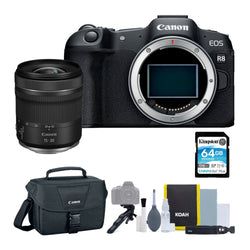
- 24.2-megapixel full-frame CMOS image sensor
- Dual Pixel CMOS AF II
- Uncropped 4K movie at up to 60 fps that is oversampled from 6K
- Maximum movie record time of 2 hours
- In-camera compositing
- 2.36 million dots OLED EVF
- 3.0-inch, 1.62 million dot vari-angle LCD touchscreen
- UVC/UAC compatibility for webcams and streaming
- Compact and lightweight unidirectional stereo microphone
- Tripod grip with bundled wireless remote control
The Canon EOS R8 Camera combines high-performance full-frame capabilities with a lightweight and compact design for creators ready to step up their content creation. With a 24.2 megapixel full-frame CMOS image sensor, an RF mount allowing access to various creative lenses, and powerful stills and video functionality, the EOS R8 camera helps you capture stunning imagery to empower your creative vision. The RF24 - 50mm F4.5-6.3 IS STM standard zoom lens is a super-compact, wide-to-standard focal length zoom lens perfect for anyone looking for strong wide-angle still imagery and video combined with easy handling and portability. Also provided in this kit is the lightweight Canon Tripod Grip HG-100BTR, so you can stabilize the EOS R8 camera on a table, counter, or another surface to help you get clear and steady photos or videos, and a detachable Bluetooth-enabled remote to operate the camera from a distance or enable you to be part of the scene. To complement the rich video quality, you can get crisp audio using the bundled Canon Stereo Microphone DM-E100 indoors and even outdoors with the included windscreen.
Lightweight and Ergonomic
Weighing less than a pound (body only), the EOS R8 camera is incredibly lightweight and compact while offering a high-quality full-frame imaging experience, utilizing the RF lens mount, and providing access to a catalog of high-performance creative lens options. This offers photographers and content creators a convenient and portable camera in a comfortable, ergonomic package for travel, hiking, or everyday shooting.
High-Quality Images
The EOS R8 camera captures stunning, detailed images with speed and accuracy, even in low light, due to the Canon-developed 24.2-million-pixel CMOS image sensor and DIGIC X Image Processor. The full-frame sensor allows for improved resolution at low ISO speeds and low noise at high ISO speeds, a wide dynamic range of still pictures, and a significant improvement in rolling shutter compared to previous Canon cameras when shooting fast-moving subjects and quick panning.
In-Camera Compositing
With its built-in image processing, the EOS R8 camera provides in-camera compositing, including Moving Subject HDR, Depth Compositing, Panoramic Shot, HDR Night Scene, and HDR Backlight control, so you can capture creative imagery that is challenging with conventional single-shot techniques.
High-Speed, High-Precision Autofocus
Dual Pixel CMOS AF II is a highly responsive system that covers up to approximately 100 x 100 percent of the picture area, breaking the image into up to 1053 automatically-selected AF zones during Whole Area AF. This enables outstanding AF coverage on the EOS R8 camera and the compositional freedom to focus sharply on a subject nearly anywhere in the frame.
Accurate Subject Detection and Tracking
Developed using Deep Learning Technology, horses, trains, and airplanes are detectable, in addition to conventional subjects like people, animals including dogs, cats, and birds, and vehicles - cars and motorcycles - especially in a motorsports environment. For more ease of use, Auto mode is now available, in which the camera automatically selects the type of subject without the need to switch the Subject Detection setting in the menu. The EOS R8 camera will continue to track the movement and continuously focus on the subject.
Animal Detection
Effectively track the whole body, face, or eye of cats, dogs, birds, and now horses, for speed and precision, regardless of the animal’s size, posture, or orientation of the face.
Ample Features for Video Creators
With video recording features such as 6K oversampled uncropped 4K movie recording at up to 60 fps, Full HD High-frame rate movie recording at up to 180 fps, and Dual Pixel CMOS AF tracking, the EOS R8 camera makes it easy to step up your video content.
Canon EOS R8 Content Creator Kit Camera with In-Camera Compositing, Stereo Microphone and Lens Cap
Type
| Type | Digital interchangeable lens, mirrorless camera |
| Image processor | DIGIC X |
| Recording media |
|
| Compatible lenses |
|
| Lens Mount | Canon RF mount |
Image Sensor
| Type | Full-frame CMOS sensor (compatible with Dual Pixel CMOS AF) |
| Effective pixels | Approx. 24.2 megapixels |
| Screen size | Approx. 36.0 x 24.0 mm |
| Pixel unit | Approx. 6.00 µm square |
| Total pixels | Approx. 25.6 megapixels |
| Aspect ratio | 3:2 (Horizontal:Vertical) |
| Color filter system | RGB primary color filters |
| Low pass filter | Installed in front of the image sensor, non-detachable |
| Dust deletion feature |
|
| Dust Delete Data acquisition and appending | |
| Manual cleaning (by hand) not supported |
Recording System
| Recording Format | Compliant to Design rule for Camera File system 2.0 and Exif 2.31. Supports time difference information in Exif 2.31 |
| Image Format | JPEG (.JPG), HEIF (.HIF), RAW, C-RAW, Dual Pixel RAW, RAW burst (.CR3) Movies: ALL-I (Time-lapse video only), IPB (.MP4) |
| File Size |
|
| Maximum Burst |
|
| File Numbering |
|
| Manual reset | |
| RAW + JPEG/HEIF Simultaneous Recording | Simultaneous recording of any combination of RAW/C-RAW and JPEG/HEIF image-recording quality is supported |
| Color Space | Selectable between sRGB and Adobe RGB |
| Picture Style |
|
White Balance
| Settings |
|
| Auto White Balance | Option between ambience priority and white priority settings, using SET button |
| White Balance Shift |
|
Viewfinder
| Type | OLED color electronic viewfinder; 0.39-inch, approx. 2.36 million dots |
| Coverage | Approx. 100 percent (at JPEG Large image quality, 3:2 aspect ratio, approx. 22 mm eyepoint) |
| Magnification/Angle of View | Approx. 0.70x / Approx. 33.0 degrees (3:2 aspect ratio, with 50mm lens at infinity, –1 m–1) |
| Eye Point | Approx. 22mm (at -1 m-1 from the eyepiece lens end) |
| Dioptric Adjustment Range | Approx. -4.0 to + 1.0 m-1 (dpt) |
| Viewfinder Information |
|
Autofocus
| Focus Method | Dual Pixel CMOS AF |
| Number of AF zones available for Automatic Selection |
|
| Selectable Positions for AF Point | AF area |
|
|
| Focusing brightness range (still photo shooting) |
|
| Focusing brightness range (in movie recording) |
|
| Available AF Areas |
|
| Available Subject Detection | |
| Auto | |
|
|
| Eye Detection |
|
| Right Eye |
|
| Left Eye |
|
| Disable |
Exposure Control
| Metering Modes |
|
| Metering Range | EV -3 - 20 (at 73°F/23°C, ISO 100)(Still Photo Shooting) |
|
|
| ISO Speed Range | ISO 200 when set to [Highlight tone priority: Enable/Enhanced] |
|
|
| Exposure Compensation | User-set ±3 stops in 1/3- or 1/2-stop increments |
|
|
| AE Lock | Auto AE lock |
|
|
| User-set AE lock | |
|
Shutter
| Type | Electronically controlled focal-plane shutter |
|
|
| Shutter Speeds | Mechanical / 1st-curtain Electronic shutter: 1/4000th sec – 30 seconds, in 1/3 or 1/2 -step increments |
|
|
| X-sync Speed | Elec. 1st-curtain: 1/200 sec |
| Shutter Release | Soft-touch electromagnetic release |
| Self Timer | 10-sec. Delay, 2-sec. Delay, Continuous |
Image Stabilization (IS mode)
| Image Stabilization | Only during movie recording (OFF during still photo shooting) |
External Speedlite
| Accessory Shoe | Canon Multi-function accessory shoe Optional Canon AD-E1 adapter required for conventional shoe-mount flashes and accessories |
| E-TTL balance | Ambience priority, standard, flash priority |
| Flash Exposure Compensation | ±3 stops in 1/3- or 1/2-stop increments |
| Continuous flash control | E-TTL each shot / E-TTL 1st shot |
Drive System
| Drive Modes and Continuous Shooting Speed | Not available when set to [Dual Pixel RAW: Enable] (low-speed continuous shooting is used) |
|
HDR Shooting
| HDR Shooting (HDR PQ) | Disable / Enable |
|
|
| HDR Mode | Off / Moving sub. / Dynamic range |
| Continuous HDR Shooting (still images) | 1 shot only / Every shot |
Video Shooting
| Shooting Times | Time available for continuous shooting in 23 degree C environment, from a cold start. If the camera is in LV mode standby before shooting or the ambient temperature is high, the shooting time may be shorter. |
|
|
| File Format | Normal Movies Click here to view the full specifications PDF |
|
|
| Estimated Recording time, Movie Bit Rate and File Size | H.264/AVC (Canon Log: Off, HDR PQ: Off) |
| Estimated Recording Time, Continued | H.265/HEVC (Canon Log: On or HDR PQ: On) |
| Video AF | Dual Pixel CMOS AF; Movie Servo AF available in AF Menu |
| Exposure Compensation | ±3 stops in 1/3- or 1/2-stop increments |
| Time Code | Yes (Count up, Start time setting, Movie recording count, Movie play count, HDMI time code on/off, HDMI rec. Command on/off, Drop frame enable/disable) |
| Movie Pre-recording (On/Off) | 3 or 5 seconds; user-selectable |
| Time-lapse Movie Setting | Interval 2 sec – 99:59:59; Number of frames 2–3,600; Movie recording size 4K/Full HD; Auto exposure fixed at first frame/auto for each frame; Beep per frame recorded (volume setting 0/silent – 5) |
| Time-lapse Playback Frame Rate | 29.97 (set to NTSC); 25.00fps (set to PAL) |
LCD Screen
| Type | TFT color, liquid-crystal monitor |
| Monitor Size | 3.0-inch (screen aspect ratio of 3:2) 2.95 in./7.5cm diagonal (2.44 in./6.2cm width, 1.65 in./4.2cm height) |
| Dots | Approx. 1.62 million dots |
| Coverage | Approx. 100 percent vertically/horizontally |
| Brightness Control | Manually adjustable to one of seven brightness levels |
| Touch-screen Operation | Supported for AF Point selection; Touch AF; Touch Shutter; Menu selection; Quick Control Menu; Magnified View; Volume Touch Sounds: 0 (silent) to 5 |
| Coating | Anti-smudge coating not provided |
| Anti-reflection coating not provided | |
| Interface Languages | 29 |
Playback
| Highlight Alert | White areas without image data blink in single-image display |
| Histogram | Brightness and RGB |
Quick Control Function
| Function | The Quick Control screen can be accessed by pressing the Quick Control button during shooting, recording, or playback |
| Quick Control Screen | Users can customize setting items shown on the Quick Control screen |
|
Image Protection and Erase
| Protection | Single image (select image) |
| Select range | |
| All images in folder | |
| All images on card | |
| All found images (only during image search) | |
| Erase | Except protected images |
|
Direct Printing
| Compatible Printers | Direct printing from camera not supported |
DPOF: Digital Print Order Format
| DPOF | Compliant to DPOF Version 1.1 |
Wi-Fi
| Supporting Standards | Equivalent to IEEE 802.11b/g/n Standards |
| Transmission Method |
|
| Transition Frequency (Central Frequency) |
|
| 5.0 ghz band | |
|
|
| Connection Method |
|
| Communication with a Smartphone |
|
| Remote Operation Using EOS Utility |
|
| Print from Wi-Fi Printers | Not supported |
| Send Images to a Web Service |
|
Bluetooth
| Standards Compliance |
|
| Transmission Method |
|
| Bluetooth Pairing |
|
Customization
| Available Functions |
|
| Customize Buttons |
|
| Customizable Dials | Functions can be assigned to the following camera controls |
|
|
| My Menu Registration | Up to six top-tier menu options and Custom Function settings can be registered |
|
Video Calls / Streaming
| USB Video Class (UVC) | Available |
Interface
| USB Terminal | Equivalent to superspeed Plus USB (USB 3.2 Gen 2) |
|
|
| HDMI Out Terminal | HDMI micro OUT terminal (Type D) |
| Clean HDMI Output | Provided |
| Microphone terminal | 3.5mm diameter stereo mini jack |
| Headphone terminal | Compatible with 3.5mm diameter stereo mini-plug |
Power Source
| Battery | Canon LP-E17 battery pack |
|
|
| Optional Battery Grip | Not supported |
| Battery Check | Automatic battery check with a 4-level display when the power switch is turned ON |
| Start-up Time | Approx. 0.4 sec. |
Dimensions and Weight
| Dimensions (W x H x D) |
|
| Weight |
|
Operating Environment
| Working Temperature Range | 32-104 degree F/0-+40 degree C |
Working Conditions
| Working Humidity | 85-percent or less |
Join the notification list for this product.
We'll email you as soon as this item is back in stock.
Use the notification email to come back and complete your purchase while inventory is available.
Join the notification list for this product.
We'll email you as soon as this item is back in stock.
Use the notification email to come back and complete your purchase while inventory is available.
Shipping Policy
Orders of $25 or more qualify for free standard shipping on eligible items.
Most in-stock orders placed before 1 PM EST Monday–Thursday ship the same business day. View Shipping Policy
Free Local Pickup
Please call for store stock availability. Requests made before 2:30 PM EST can be available for next-day pickup. Learn more


Tab: Frequently Asked Questions
How do I return an item?
How do I return an item?
Returns are incredibly simple. Please log into your account, find your item you wish to return and follow the prompts to make a return. If you do not have an account, click here to find your order and make a return.
Will I receive a full refund when I return an item?
Will I receive a full refund when I return an item?
You will receive a full refund when you return an item in its original manufacturer’s packaging, undamaged and unmarked. If the item you are returning is priced at less than $35, you will be charged a 15% restocking fee. Please note you will not be refunded any shipping charges.
How many days do I have to make a return?
How many days do I have to make a return?
You have 30 days to make a return. During the holiday season, from November 1 to December 31, we extend the return window to 60 days.
My item was damaged in transit. How do I place a return?
My item was damaged in transit. How do I place a return?
If your order has been noticeably damaged in transit, we strongly recommend that you refuse delivery and notify us immediately. Claims for missing items or items damaged in transit must be made within 48 hours of delivery. If there is carrier damage, please contact support@focuscamera.com with your order number and a description of the damage.
There’s an issue with my order, what should I do?
There’s an issue with my order, what should I do?
Oh no! Please contact our customer service team so we can resolve the issue immediately. You can call us on 1.800.221.0828, email us at support@focuscamera.com, or send us a message here.
Can I exchange an item?
Can I exchange an item?
We do not currently offer exchanges. Please return the item you purchased within 30 days and order what you’d like instead.
If I ordered a kit, do I have to return all the items?
If I ordered a kit, do I have to return all the items?
If you ordered a kit, you must return all components and accessories to receive a full refund.
I ordered a product that included a free item. I’d like to return it, do I need to return the free item as well?
I ordered a product that included a free item. I’d like to return it, do I need to return the free item as well?
If you ordered a product that included a free item, you must include the free item with your return. If not, your return will not be accepted and you will not receive a full refund.
Do you offer repairs?
Do you offer repairs?
We currently only offer camera repairs at our Brooklyn store. The item must be dropped off and collected in person as we do not accept shipped items for repair. For more information, please call our Brooklyn store on 1.718.431.7900.
What is your return policy?
What is your return policy?
Most items can be returned within 30 days for a full refund. Click here to read our full return policy.


