


- Canon EOS R50 V Mirrorless Camera
- EOS R50 V Mirrorless camera Body
- Camera Cover R-F-5
- Battery Pack LP-E17
- Battery Charger LC-E17
- Neck Strap EM-200DG
Trusted & Verified


Canon EOS R50 V Mirrorless Camera
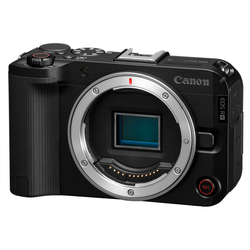
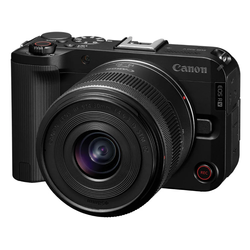
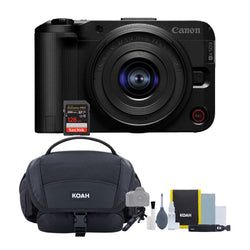
- 24.2MP APS-C CMOS Image Sensor
- DIGIC X Image Processor with up to 4K Crop 59.94p
- 4K 29.97p full-width and Full HD full-width 119.8p recording
- APS-C CMOS sensor
- Canon RF mount
- 3.0-inch TFT color, liquid-crystal monitor
- 2.4Ghz and 5Ghz band Wi-Fi
- Slow and Fast mode
- Four different built-in Live streaming modes
Step up your video creation with the EOS R50 V, an APS-C Mirrorless EOS V Series camera designed to bring the best of Cinema EOS and EOS cameras into one powerful tool.
Designed for Creators
Built with direct feedback from creators, the EOS R50 V features a bold, modern design that stands out and is easy to take anywhere. Beyond portability, it offers a smooth powered zoom lever (for Power Zoom lenses), a 3-microphone array for clear audio with noise reduction, and Canon’s latest Multi-function shoe for attaching and powering compatible accessories.
Vertical & Horizontal Mounting
Perfect for today’s content creators, the camera includes both vertical and horizontal tripod mounts—one on the grip’s side and another on the bottom. When in Movie mode, the menus automatically rotate to match the camera’s orientation.
Confident Recording
Designed for creators who spend time in front of the camera, the EOS R50 V has two Record buttons—one on the front for vlogging and another in the traditional shutter position. A red tally light (visible from the front and top) and an LCD recording border ensure you never miss when the camera is rolling.
Ready to Create
The built-in zoom lever lets you control Power Zoom lenses like the RF14-30mm F4-6.3 IS STM PZ directly from the camera. Zoom speed is fully customizable for both pre-recording and active recording. The camera also includes Mic, Headphone, and E3 Remote ports for expanded creative control.
Pro-Level Video Simplified
A new mode dial features seven video-focused modes, including Automatic video exposure, Close-Up Demo mode (great for e-commerce or product presentations), Movie Image Stabilization for steady vlogs, and Smooth Skin mode for on-camera appearance.
Creative Speed Control
The Slow and Fast mode provides in-camera control of frame rates and playback speeds. Record UHD 4K, UHD 4K Crop, or Full-HD with frame rates up to 59.94p in 4K Crop and 119.8p in Full-HD, allowing for slow-motion and time-lapse effects without extra editing.
Cinematic Color & Look
Advanced creators will appreciate features like Canon Log 3, HLG, PQ, and Canon709 recording with 4:2:2 10-bit color for professional-quality video. A new Color Filter mode adds 14 unique color options, while the new Cinema View mode enables instant 2.35:1 letterboxed cinematic framing.
| Camera Type | Digital interchangeable lens, mirrorless camera |
| Image Processor | DIGIC X |
| Lens Mount | Canon RF mount |
| Sensor Type | APS-C CMOS sensor (compatible with Dual Pixel CMOS AF) |
| Sensor Effective Pixels | Approx. 24.0 megapixels |
| Sensor Aspect Ratio | 3:2 (Horizontal:Vertical) |
| White Balance Settings | Auto (Ambience priority/White priority), Daylight, Shade, Cloudy, Tungsten light, White fluorescent light, Flash, Manual, Color temperature 1-4 |
| Focus Method | Dual Pixel CMOS AF |
| AF Available Subject Detection | Auto, People, Animals (dogs / cats / birds/ horses), Vehicles (motorsports cars / motorcycles / airplanes / trains) |
| Shutter Release | Soft-touch electromagnetic release |
| Self Timer | 10-sec. delay, 2-sec. delay, Continuous |
| Accessory Shoe | Canon Multi-function accessory shoe. Optional Canon AD-E1 adapter required for conventional shoe-mount flashes and accessories. |
| E-TTL Balance | Ambience priority, standard, flash priority |
| Flash Exposure Compensation | +/- 3 (in 1/3-stop increments) |
| Continuous Flash Control | E-TTL each shot / E-TTL 1st shot |
| Video Resolution | 4K (UHD 3840 x 2160, 16:9, oversampled from 6K recording), 4K Crop (3840 x 2160, not oversampled), Full HD (1920 x 1080) |
| Video Compression | LongGOP (equivalent to IPB); Intra (= All-I) for Time Lapse video recording |
| Video Gamma, Color Space Options (in CP/Custom Picture menu) | Canon 709, Canon Log 3, PQ (HDR PQ, BT.2020), HLG (BT.2020), BT.709 Standard |
| Vertical Video Recording | Available (video shooting info display can be rotated, for shooting and playback. Vertical tripod socket on grip side of camera. Auto Level display available during video recording.) |
| Video Bit Depth | 8 bit / 10 bit |
| LCD Screen Type | TFT color, liquid-crystal monitor |
| LCD Screen Monitor Size | 3.0-inch (screen aspect ratio of 3:2) |
| LCD Screen Dots | Approx. 1.04 million dots |
| LCD Screen Coverage | Approx. 100% vertically/horizontally |
| LCD Screen Brightness Control | Manually adjustable to one of seven brightness levels |
| Interface Languages | English, German, French, Dutch, Danish, Portuguese, Finnish, Italian, Ukraine, Norwegian, Swedish, Spanish, Greek, Russian, Polish, Czech, Hungarian, Vietnamese, Hindi, Romanian, Turkish, Arabic, Thai, Simplified/Traditional Chinese, Korean, Malay, Indonesian, Japanese. |
| Wi-Fi Supporting Standards | Equivalent to IEEE 802.11b/g/n Standards |
| Bluetooth Standards Compliance | Bluetooth Version 4.2 compliant (Bluetooth Low Energy technology) |
| USB Video Class (UVC) | Available |
| Live Switcher Mobile Streaming | Available |
| HDMI Streaming | Available |
| Camera Connect Streaming | Available |
| Battery | Canon LP-E17 battery pack |
| Start-up Time | Approx. 0.4 sec. |
| Dimensions (WxHxD) | 4.7 x 2.9 x 1.8 inches |
| Weight | 0.71 lbs. (without battery and card) |
Join the notification list for this product.
We'll email you as soon as this item is back in stock.
Use the notification email to come back and complete your purchase while inventory is available.
Join the notification list for this product.
We'll email you as soon as this item is back in stock.
Use the notification email to come back and complete your purchase while inventory is available.
Shipping Policy
Free standard shipping is available on eligible orders of $25 or more.
We strive to process and ship orders as quickly as possible. Shipping times may vary based on product availability, order processing, and fulfillment schedules. View Shipping Policy
Free Local Pickup
Please call to confirm in-store stock availability. Pickup requests made before 2:30 PM ET may be available for next-day pickup. Learn more.


Tab: Frequently Asked Questions
How do I return an item?
How do I return an item?
To initiate a return, sign in to your Account Page, locate your order, and follow the instructions to submit a return request.
If you checked out as a guest or need assistance, please contact our Customer Service team at support@focuscamera.com or call 1-800-221-0828 (ext. 8202).
Returns are subject to eligibility requirements outlined in our Return Policy.
Will I receive a full refund when I return an item?
Will I receive a full refund when I return an item?
Refund eligibility and amounts may vary depending on the reason for return, product condition, and applicable fees. All returns are subject to inspection and must meet the requirements outlined in our Return Policy.
How many days do I have to make a return?
How many days do I have to make a return?
Most eligible items may be returned within 30 days of purchase. Return periods and restrictions may vary by product or brand.
Extended return periods may be available for eligible purchases during the holiday season. Please review our Return Policy for applicable deadlines, eligibility requirements, and exclusions.
My item was damaged in transit. How do I place a return?
My item was damaged in transit. How do I place a return?
If your order arrives with visible shipping damage, we recommend refusing delivery when possible and notifying us immediately.
Claims for missing or damaged items must be reported within 48 hours of delivery. Please contact our Customer Service team at support@focuscamera.com with your order number, a description of the issue, and photos of the damage, if available.
There’s an issue with my order, what should I do?
There’s an issue with my order, what should I do?
If you experience an issue with your order, please contact our Customer Service team at 1-800-221-0828 (ext. 8202), email support@focuscamera.com, or visit our Contact Us page.
Please include your order number and a brief description of the issue so we can assist you.
Can I exchange an item?
Can I exchange an item?
We do not offer exchanges for different products. However, replacements for the same item may be available depending on the circumstances and product eligibility.
Please contact our Customer Service team at support@focuscamera.com or 1-800-221-0828 (ext. 8202) for assistance. For additional details, please review our Return Policy.
If I ordered a kit, do I have to return all the items?
If I ordered a kit, do I have to return all the items?
Yes. When returning an eligible kit, all included components, accessories, and original packaging must be returned. Missing items may affect your refund eligibility or amount, in accordance with our Return Policy.
I ordered a product that included a free item. I’d like to return it, do I need to return the free item as well?
I ordered a product that included a free item. I’d like to return it, do I need to return the free item as well?
Yes. Any complimentary or promotional items included with your original purchase must also be returned. If these items are not included, their value will be deducted from your applicable refund, in accordance with our Return Policy.
Do you offer repairs?
Do you offer repairs?
We currently offer camera repair services exclusively at our Brooklyn, NY location. All repairs require in-person drop-off and pickup, as we do not accept items shipped to us for repair.
For additional information or assistance, please contact our Brooklyn store at 1-718-431-7900.
What is your return policy?
What is your return policy?
Return eligibility, timeframes, and conditions may vary depending on the product or brand. For complete details on returns, refunds, and applicable restrictions, please visit our Return Policy page.


