


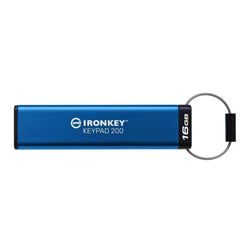
- Kingston IronKey Keypad 200 Series 16GB USB-A Encrypted Flash Drive (Blue)
Trusted & Verified


Kingston IronKey Keypad 200 Series 16GB USB-A Encrypted Flash Drive (Blue)
- Military-Grade Security
- Advanced Hardware Encryption
- Tamper-Resistant Design
- OS & Device Independent
- Built-In Keypad Access
- Multi-PIN Functionality
- Read-Only Protection Modes
The Kingston IronKey Keypad 200 series is OS-independent hardware-encrypted USB Type-A and USB Type-C1 drives with an alphanumeric keypad for easy-to-use PIN access. The KP200 series is FIPS 140-3 Level 3 Validated for security with enhancements that elevate the bar for data protection and incorporate XTS-AES 256-bit hardware-based encryption. Its circuitry is covered by a layer of special epoxy that makes it virtually impossible to remove components without damaging them; this tough epoxy stops attacks against the semiconductor components.
FIPS 140-3 Level 3 (Pending) Certified
KP200 now meets the new FIPS 140-3 Level 3 security specifications published by NIST. This is an enhanced version of the FIPS 140-2 specifications that further enhances the drive’s security capabilities and tamper-resistance. It includes XTS-AES 256-bit encryption along with Brute Force and BadUSB attack protection with digitally signed firmware. Its circuitry is covered by a layer of special epoxy that makes it virtually impossible to remove components without damaging them; this tough epoxy stops attacks against the semiconductor components.
OS and Device Independent
With KP200 utilizing a rechargeable battery, the keypad can be used to unlock the drive without using any software, and then plug it into any system that supports a USB Type-A or USB Type-C mass storage device. This gives users the most flexibility across different platform types and operating systems.
Multi-PIN Option
Users have the option to set up a User or an Admin/User mode. Admin can be used to restore a User PIN and provide access to the drive should the User PIN be forgotten or if the drive is locked after reaching the maximum of 10 User login attempts.
Global and Session Read-Only (Write Protect) Modes
Both Admin and User can set a session-based Read-Only mode to protect the drive from malware on untrusted systems. Admin can also set a Global Read-Only mode that sets the drive in Read-Only mode until reset.
| Key Certifications | FIPS 140-3 Level 3 Validated, Certificate #5133 |
| Interface | USB 3.2 Gen 1 |
| Connector | Type-A |
| Capacity | 16GB |
| Dimensions (drive with sleeve) | 80mm x 20mm x 11mm |
| Dimensions (drive without sleeve) | Type-A: 78mm x 18mm x 8mm |
| Speed | 145MB/s read, 115MB/s write |
| Waterproof/Dustproof | IP68 certified |
| Operating Temperature | 0°C to 50°C |
| Storage Temperature | -20°C to 60°C |
| Minimum System Requirements | USB 3.0 compliant and 2.0 compatible |
| Compatible with | OS-independent: Microsoft Windows, macOS, Linux, ChromeOS, Android5 or any system that supports a USB mass storage device. |
Join the notification list for this product.
We'll email you as soon as this item is back in stock.
Use the notification email to come back and complete your purchase while inventory is available.
Join the notification list for this product.
We'll email you as soon as this item is back in stock.
Use the notification email to come back and complete your purchase while inventory is available.
Shipping Policy
Orders of $25 or more qualify for free standard shipping on eligible items.
Most in-stock orders placed before 3PM EST Monday–Friday ship the same business day. View Shipping Policy
Free Local Pickup
Please call for store stock availability. Requests made before 2:30 PM EST can be available for next-day pickup. Learn more


Tab: Frequently Asked Questions
How do I return an item?
How do I return an item?
Returns are incredibly simple. Please log into your account, find your item you wish to return and follow the prompts to make a return. If you do not have an account, click here to find your order and make a return.
Will I receive a full refund when I return an item?
Will I receive a full refund when I return an item?
You will receive a full refund when you return an item in its original manufacturer’s packaging, undamaged and unmarked. If the item you are returning is priced at less than $35, you will be charged a 15% restocking fee. Please note you will not be refunded any shipping charges.
How many days do I have to make a return?
How many days do I have to make a return?
You have 30 days to make a return. During the holiday season, from November 1 to December 31, we extend the return window to 60 days.
My item was damaged in transit. How do I place a return?
My item was damaged in transit. How do I place a return?
If your order has been noticeably damaged in transit, we strongly recommend that you refuse delivery and notify us immediately. Claims for missing items or items damaged in transit must be made within 48 hours of delivery. If there is carrier damage, please contact support@focuscamera.com with your order number and a description of the damage.
There’s an issue with my order, what should I do?
There’s an issue with my order, what should I do?
Oh no! Please contact our customer service team so we can resolve the issue immediately. You can call us on 1.800.221.0828, email us at support@focuscamera.com, or send us a message here.
Can I exchange an item?
Can I exchange an item?
We do not currently offer exchanges. Please return the item you purchased within 30 days and order what you’d like instead.
If I ordered a kit, do I have to return all the items?
If I ordered a kit, do I have to return all the items?
If you ordered a kit, you must return all components and accessories to receive a full refund.
I ordered a product that included a free item. I’d like to return it, do I need to return the free item as well?
I ordered a product that included a free item. I’d like to return it, do I need to return the free item as well?
If you ordered a product that included a free item, you must include the free item with your return. If not, your return will not be accepted and you will not receive a full refund.
Do you offer repairs?
Do you offer repairs?
We currently only offer camera repairs at our Brooklyn store. The item must be dropped off and collected in person as we do not accept shipped items for repair. For more information, please call our Brooklyn store on 1.718.431.7900.
What is your return policy?
What is your return policy?
Most items can be returned within 30 days for a full refund. Click here to read our full return policy.


