


- Oyen Digital 2TB U34 Bolt USB4 / Thunderbolt 4 External SSD
- USB-C Cable
Trusted & Verified


Oyen Digital 2TB U34 Bolt USB4 / Thunderbolt 4 External SSD
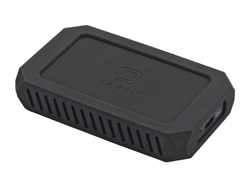
- 2TB PCIe 4.0 x4 external SSD storage
- Up to 2800 MB/s sustained transfer speeds
- USB4 and Thunderbolt 4 connectivity
- Compatible with Thunderbolt and USB hosts
- MIL-STD-810F shock vibration and dust resistance
- Self-cooling aluminum core design
- Bus-powered for portable operation
- Works with Mac, Windows, Linux, Android, and ChromeOS
Built for creators, professionals, and users handling large files, the 2TB U34 Bolt USB4 / Thunderbolt 4 External SSD delivers high-speed performance for demanding workflows. Equipped with a PCIe 4.0 x4 SSD and USB4 / Thunderbolt 4 connectivity, it provides fast file transfers while supporting a wide range of devices. Its durable construction and cooling design help maintain performance during extended use.
High-Speed Data Transfers
Transfer large files with sustained speeds of up to 2800 MB/s. Move high-resolution media, project files, and large data sets in less time to improve workflow efficiency.
Broad Device Compatibility
Supports Thunderbolt 4, Thunderbolt 3, USB4, USB 3.2 Gen 2, and USB 3.2 Gen 1 connections. This allows easy use across multiple devices and operating systems without limiting workflow flexibility.
Built for Demanding Environments
Designed with an MIL-STD-810F rating for resistance against shock, vibration, and dust. The durable construction helps protect stored data during travel and daily use.
Cooling Design for Stable Performance
The self-cooling aluminum core helps manage internal temperatures during heavy workloads. This supports consistent performance during large file transfers and extended sessions.
Portable and Bus-Powered Operation
Powered directly through the connected device with no additional power adapter required. The compact design makes it easy to bring high-speed storage between workstations or locations.
Cross-Platform Support
Preformatted for Mac systems and compatible with Windows, Linux, Android, and ChromeOS after reformatting when needed. Supports flexible use across different environments.
| Total Installed Storage | 2 TB |
| Drive Type | PCIe SSD |
Performance
| Read Speed | Maximum: 2800 MB/s |
| Write Speed | Maximum: 2800 MB/s |
| Default OS Support | Mac |
| *Alternate OS Support via Re-Format | |
| Encryption Support | No |
| Endurance (Total Bytes Written) | 1200 TB |
External Enclosure
| System Connection | USB-C (Thunderbolt 4) |
| Security Features | No |
| Material | Aluminum |
| Fan Cooled | No |
| Impact Resistance | Shock/Vibration-Resistant (MIL-STD-810) |
| Environmental Resistance | Dust-Resistant (Unrated) |
Electrical
| Power Source | Bus Powered |
General
| Operating Conditions | 32 to 158°F / 0 to 70°C |
| Dimensions | 4.5 x 2.7 x 0.75 in / 11.4 x 6.9 x 1.91 cm |
| Weight | 8 oz / 227 g |
Packaging Info
| Package Weight | 0.815 lb |
| Box Dimensions (LxWxH) | 6.4 x 4.8 x 1.7 in |
Join the notification list for this product.
We'll email you as soon as this item is back in stock.
Use the notification email to come back and complete your purchase while inventory is available.
Join the notification list for this product.
We'll email you as soon as this item is back in stock.
Use the notification email to come back and complete your purchase while inventory is available.
Shipping Policy
Orders of $25 or more qualify for free standard shipping on eligible items.
Most in-stock orders placed before 3PM EST Monday–Friday ship the same business day. View Shipping Policy
Free Local Pickup
Please call for store stock availability. Requests made before 2:30 PM EST can be available for next-day pickup. Learn more


Tab: Frequently Asked Questions
How do I return an item?
How do I return an item?
Returns are incredibly simple. Please log into your account, find your item you wish to return and follow the prompts to make a return. If you do not have an account, click here to find your order and make a return.
Will I receive a full refund when I return an item?
Will I receive a full refund when I return an item?
You will receive a full refund when you return an item in its original manufacturer’s packaging, undamaged and unmarked. If the item you are returning is priced at less than $35, you will be charged a 15% restocking fee. Please note you will not be refunded any shipping charges.
How many days do I have to make a return?
How many days do I have to make a return?
You have 30 days to make a return. During the holiday season, from November 1 to December 31, we extend the return window to 60 days.
My item was damaged in transit. How do I place a return?
My item was damaged in transit. How do I place a return?
If your order has been noticeably damaged in transit, we strongly recommend that you refuse delivery and notify us immediately. Claims for missing items or items damaged in transit must be made within 48 hours of delivery. If there is carrier damage, please contact support@focuscamera.com with your order number and a description of the damage.
There’s an issue with my order, what should I do?
There’s an issue with my order, what should I do?
Oh no! Please contact our customer service team so we can resolve the issue immediately. You can call us on 1.800.221.0828, email us at support@focuscamera.com, or send us a message here.
Can I exchange an item?
Can I exchange an item?
We do not currently offer exchanges. Please return the item you purchased within 30 days and order what you’d like instead.
If I ordered a kit, do I have to return all the items?
If I ordered a kit, do I have to return all the items?
If you ordered a kit, you must return all components and accessories to receive a full refund.
I ordered a product that included a free item. I’d like to return it, do I need to return the free item as well?
I ordered a product that included a free item. I’d like to return it, do I need to return the free item as well?
If you ordered a product that included a free item, you must include the free item with your return. If not, your return will not be accepted and you will not receive a full refund.
Do you offer repairs?
Do you offer repairs?
We currently only offer camera repairs at our Brooklyn store. The item must be dropped off and collected in person as we do not accept shipped items for repair. For more information, please call our Brooklyn store on 1.718.431.7900.
What is your return policy?
What is your return policy?
Most items can be returned within 30 days for a full refund. Click here to read our full return policy.


